
 Okay, so you’re a startup and you’re launching a new website or app. How do you communicate this to users, journalists and investors? ScreenFlow makes it easy by allowing you to create screencasts, including tutorial videos, training videos, how-to lessons, marketing videos, and product demos.
With ScreenFlow you can record the contents of your entire monitor while also capturing your video camera, microphone and your computer audio. The easy-to-use editing interface lets you creatively edit your video, and add additional images, text, music and transitions for a truly professional-looking video. The finished result is a QuickTime or Windows Media movie, ready for publishing to your Web site or blog or directly to YouTube.
The one thing that really sets ScreenFlow apart from the competition is its editor, which is similar to iMovie, only easier to use. The editor supports multiple audio and video tracks; clips can be split, trimmed and repositioned; and transitions can be added between clips. This allows you to perfect your screencast without ever leaving ScreenFlow.
The latest version of ScreenFlow includes some new features:
- Batch Upload is our favorite. It makes batch processing a breeze.
- Set the frame rate of recording to improve efficiency and decrease overall file size.
- Your iPhone and iPad screens can now be recorded, right into ScreenFlow just like your iSight or DV Camera.
- Quickly confirm you’re in shot and you’ve got the right angle. The Recording Preview gives a continual spot check of your shot to ensure all is properly aligned, while also displays total elapsed time of your recording.
- Bring files in directly from higher-end Sony, Panasonic, and other HD camcorders – no conversion necessary.
- New Snapback Actions quickly reverts video state. Action templates enable you to choose from a default list of popular actions, and also build a catalog of your favorites for repeated use in all your productions.
- Rolling Edits allow you to move an edit point without affecting the rest of the timeline. The result is the first (outgoing) clip is made shorter while the second (incoming) clip is made longer by the same amount, or vice versa. The net effect being the overall program length is not altered.
- New Clip Management features streamline your editing process. Color labels on clips visually organize your project. Clip-based markers ensure the marker stays with the clip as opposed to the timeline. Clean-up sources not being used removes extraneous media from your project.
- ScreenFlow’s existing captioning support has been rounded out with the ability to import SRT files into your ScreenFlow 5 projects.
- Access to your iPhoto and iTunes libraries right in ScreenFlow 5’s Media Library.
- The new App Preview export option ensures your file adheres to Apple’s specifications for Preview on the Mac App Store.
- Ensure you always have a local copy of your published projects when publishing to one of ScreenFlow’s integrated destinations.
- And more!
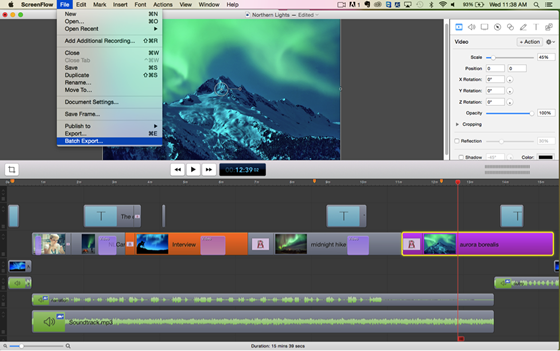
The list of features ScreenFlow has to offer is enormous. Below are some of the highlights:
- Record from your monitor, a video camera, microphone and computer’s audio all at the same time
- Full screen HD capture, optimized for the best, most efficient screen capture
- Keynote and PowerPoint support
- Intuitive editing interface allows you to add professional touches:
◊ Full range of elegant 2D & 3D transitions
◊ ‘Callouts’ to blur and highlight areas on screen
◊ ‘Video Annotations’ to draw circles, squares, lines and arrows
◊ Elegant text and titles
◊ Video actions to zoom, pan and add motion
◊ Customizable cursors
◊ Advanced audio controls
◊ Clip speed changes, freeze frames
◊ Use cursor keys to move video clips around the canvas
◊ Set exact position for an object by entering the coordinates in the inspector
◊ Full screen preview - Export using multiple preset settings
- Customize and save your own export settings
- Publish directly to YouTube, or export to an all-in-one Flash video presentation
- Full integration with Elgato Turbo H.264 for speedier exports of your H.264 movies
- Optimized to take advantage of productivity enhancements in Mac OS X Lion.
- Nested clips lets you merge multiple elements into a single (nested) clip
- Access and edit nested content on a separate tabbed timeline
- Apply filters and video actions to nested clips as a way to join content
- High quality Chroma Key filter
- Export faster, higher quality MPEG-4 files using the x264 codec
- An array of built-in filters to add effects to videos and images
- Set the duration of time you want ScreenFlow to record
- Insert a text clip, an annotation clip or any media in your library to fill an existing gap in the timeline
All in all, ScreenFlow is a must have for every entrepreneur!





was looking for better understanding about screenflow software and glad to read your short and simple review here. precise and well written highlighting the features it has. I just need a screen recorder with premium editing features which i hope screenflow will perfectly do it.
Thanks.
Robin.
Might be useful to clarify that the software only works on Apple Computers…